

资源服务器搭建
1.1 依赖
xml
             <spring-cloud.version>Hoxton.SR12</spring-cloud.version>
			 <version>2.3.12.RELEASE</version>
<!--oauth2依赖-->
        <dependency>
            <groupId>org.springframework.cloud</groupId>
            <artifactId>spring-cloud-starter-oauth2</artifactId>
        </dependency>
        <!--security依赖-->
        <dependency>
            <groupId>org.springframework.cloud</groupId>
            <artifactId>spring-cloud-starter-security</artifactId>
        </dependency>
        <!--boot依赖-->
        <dependency>
            <groupId>org.springframework.boot</groupId>
            <artifactId>spring-boot-starter</artifactId>
        </dependency>
        <!--test依赖-->
        <dependency>
            <groupId>org.springframework.boot</groupId>
            <artifactId>spring-boot-starter-test</artifactId>
            <scope>test</scope>
        </dependency>
        <!--  WEB      -->
        <dependency>
            <groupId>org.springframework.boot</groupId>
            <artifactId>spring-boot-starter-web</artifactId>
        </dependency>
1.2 配置类
- 注意:我么认证服务器生成的公钥
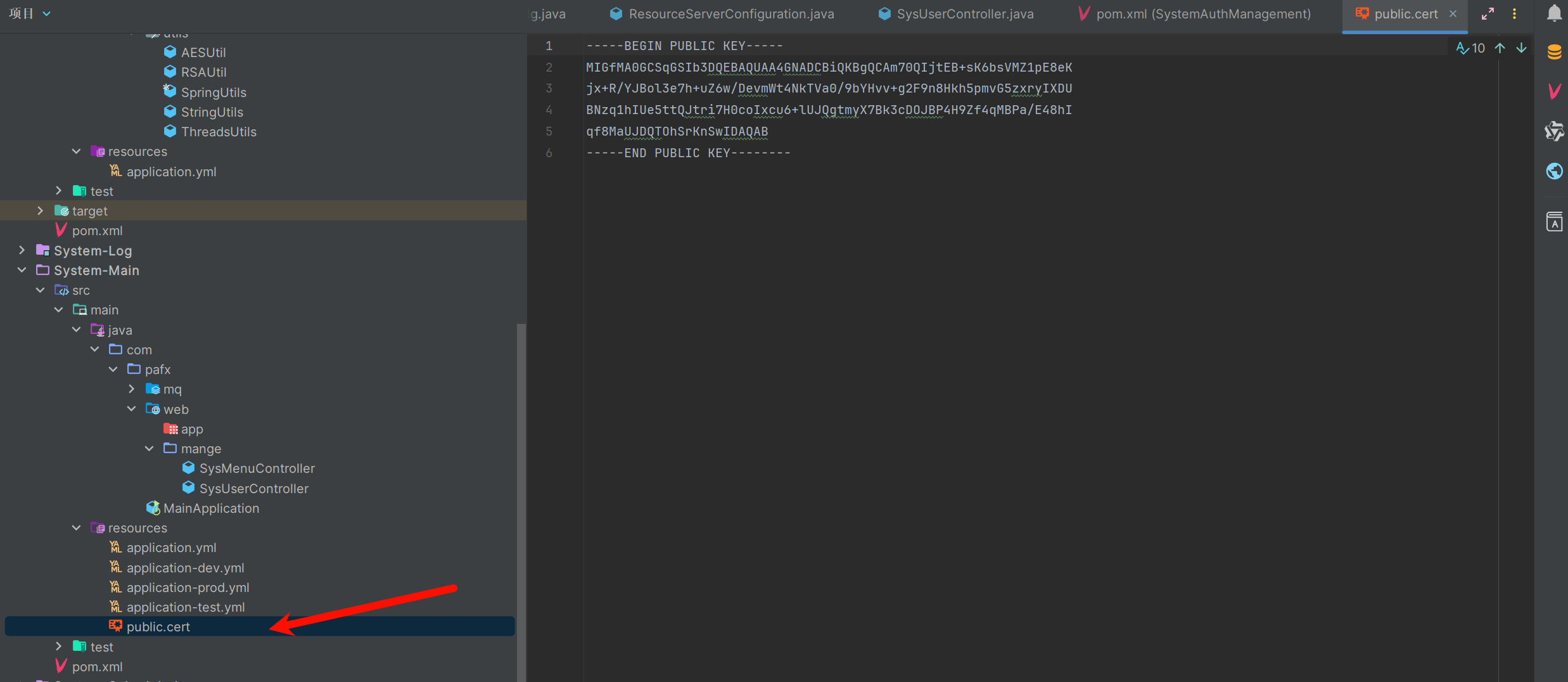
- 我们硬编码了资源服务器的 ID 为 userservice;
- 现在我们使用的是不落数据库的 JWT 方式 + 非对称加密,需要通过本地公钥进行验证,因此在这里我们配置了公钥的路径。
java
package com.pafx.config;

import org.springframework.context.annotation.Bean;
import org.springframework.context.annotation.Configuration;
import org.springframework.core.io.ClassPathResource;
import org.springframework.core.io.Resource;
import org.springframework.security.config.annotation.method.configuration.EnableGlobalMethodSecurity;
import org.springframework.security.config.annotation.web.builders.HttpSecurity;
import org.springframework.security.oauth2.config.annotation.web.configuration.EnableResourceServer;
import org.springframework.security.oauth2.config.annotation.web.configuration.ResourceServerConfigurerAdapter;
import org.springframework.security.oauth2.config.annotation.web.configurers.ResourceServerSecurityConfigurer;
import org.springframework.security.oauth2.provider.token.TokenStore;
import org.springframework.security.oauth2.provider.token.store.JwtAccessTokenConverter;
import org.springframework.security.oauth2.provider.token.store.JwtTokenStore;
import org.springframework.util.FileCopyUtils;

import java.io.IOException;

/**
 * @Description 资源服务器配置
 * @Author EasonShu
 * @Data 2025/1/2 下午4:28
 */
@Configuration
@EnableResourceServer //启用资源服务器
@EnableGlobalMethodSecurity(prePostEnabled = true) //启用方法注解方式来进行权限控制
public class ResourceServerConfiguration extends ResourceServerConfigurerAdapter {

    /**
     * 声明了资源服务器的 ID 是 userservice,声明了资源服务器的 TokenStore 是 JWT
     *
     * @param resources
     * @throws Exception
     */
    @Override
    public void configure(ResourceServerSecurityConfigurer resources) throws Exception {
        resources.resourceId("资源ID").tokenStore(tokenStore());
    }

    /**
     * 配置 TokenStore
     *
     * @return
     */
    @Bean
    public TokenStore tokenStore() {
        return new JwtTokenStore(jwtAccessTokenConverter());
    }

    /**
     * 配置公钥: 校验Token合法性,也可以通过redis或远程调用来校验
     *
     * @return
     */
    @Bean
    protected JwtAccessTokenConverter jwtAccessTokenConverter() {
        JwtAccessTokenConverter converter = new JwtAccessTokenConverter();
        Resource resource = new ClassPathResource("public.cert");
        String publicKey = null;
        try {
            publicKey = new String(FileCopyUtils.copyToByteArray(resource.getInputStream()));
        } catch (IOException e) {
            e.printStackTrace();
        }
        converter.setVerifierKey(publicKey);
        return converter;
    }

    /**
     * 配置了除了 /user 路径之外的请求可以匿名访问
     *
     * @param http
     * @throws Exception
     */
    @Override
    public void configure(HttpSecurity http) throws Exception {
        http.authorizeRequests()
                .antMatchers("/api/**").authenticated()
                .anyRequest().permitAll();
    }
}
1.3 测试类
GET /user/name接口,读权限或写权限可访问,返回登录用户名;GET /user接口,读权限或写权限可访问,返回登录用户信息;POST /user接口,只有写权限可以访问,返回访问令牌中的额外信息(也就是自定义的 Token 增强器 CustomTokenEnhancer 加入到访问令牌中的额外信息,Key 是 userDetails),这里也演示了使用 TokenStore 来解析 Token 的方式。
java
@RestController
@RequestMapping("user")
public class UserController {
    @Autowired
    private TokenStore tokenStore;

    /***
     * 读权限或写权限可访问,返回登录用户名
     * @param authentication
     * @return
     */
    @PreAuthorize("hasAuthority('READ') or hasAuthority('WRITE')")
    @GetMapping("name")
    public String name(OAuth2Authentication authentication) {
        return authentication.getName();
    }

    /**
     * 读权限或写权限可访问,返回登录用户信息
     *
     * @param authentication
     * @return
     */
    @PreAuthorize("hasAuthority('READ') or hasAuthority('WRITE')")
    @GetMapping
    public OAuth2Authentication read(OAuth2Authentication authentication) {
        return authentication;
    }

    /**
     * 只有写权限可以访问,返回访问令牌中的额外信息
     *
     * @param authentication
     * @return
     */
    @PreAuthorize("hasAuthority('WRITE')")
    @PostMapping
    public Object write(OAuth2Authentication authentication) {
        OAuth2AuthenticationDetails details = (OAuth2AuthenticationDetails) authentication.getDetails();
        OAuth2AccessToken accessToken = tokenStore.readAccessToken(details.getTokenValue());
        return accessToken.getAdditionalInformation().getOrDefault("userDetails", null);
    }
}- 1:认证服务器获取token
json
POST http://localhost:8080/oauth/token?grant_type=client_credentials&client_id=userservice2&client_secret=1234

HTTP/1.1 200
Cache-Control: no-store
Pragma: no-cache
X-Content-Type-Options: nosniff
X-XSS-Protection: 1; mode=block
X-Frame-Options: DENY
Content-Type: application/json;charset=UTF-8
Transfer-Encoding: chunked
Date: Fri, 18 Dec 2020 07:06:56 GMT
Keep-Alive: timeout=60
Connection: keep-alive

{
  "access_token": "eyJhbGciOiJSUzI1NiIsInR5cCI6IkpXVCJ9.eyJhdWQiOlsidXNlcnNlcnZpY2UiXSwic2NvcGUiOlsiRk9PIl0sImV4cCI6MTYwODI4MjQxNiwiYXV0aG9yaXRpZXMiOlsiUkVBRCIsIldSSVRFIl0sImp0aSI6IjI0ZjhjMGMzLWE0NTQtNGQwYy04NTAxLTQ2MjY0YjMyZTliMCIsImNsaWVudF9pZCI6InVzZXJzZXJ2aWNlMiJ9.H5knrswTnlEnWYfb21EGcYFenIg1gU0hNyy1RELKrQWFuBAocDA_P4OxxzCQ-I4IVxq2N4E5_ve-Oo28jzgWvpgT9LD6BX6KZkw8a2mozgy4Jh-6eLKyIrvf-kX9qaCkztcQoFrqcFloLEsJMeCO7aCXwsflli4f6VbdfltGXpk",
  "token_type": "bearer",
  "expires_in": 7199,
  "scope": "FOO",
  "jti": "24f8c0c3-a454-4d0c-8501-46264b32e9b0"
}- 2:将token携带去资源服务器请求,不管以哪种模式拿到访问令牌,我们用具有读权限的访问令牌访问资源服务器的如下地址(请求头加入
Authorization: Bearer XXXXXXXXXX,其中 XXXXXXXXXX 代表访问令牌):
json
GET http://localhost:8081/user

HTTP/1.1 200
X-Content-Type-Options: nosniff
X-XSS-Protection: 1; mode=block
Cache-Control: no-cache, no-store, max-age=0, must-revalidate
Pragma: no-cache
Expires: 0
X-Frame-Options: DENY
Content-Type: application/json
Transfer-Encoding: chunked
Date: Fri, 18 Dec 2020 09:37:57 GMT
Keep-Alive: timeout=60
Connection: keep-alive

{
  "authorities": [
    {
      "authority": "READ"
    }
  ],
  "details": {
    "remoteAddress": "127.0.0.1",
    "sessionId": null,
    "tokenValue": "eyJhbGciOiJSUzI1NiIsInR5cCI6IkpXVCJ9.eyJhdWQiOlsidXNlcnNlcnZpY2UiXSwidXNlcl9uYW1lIjoicmVhZGVyIiwic2NvcGUiOlsiRk9PIl0sImV4cCI6MTYwODI5MTMwNiwidXNlckRldGFpbHMiOnsicGFzc3dvcmQiOm51bGwsInVzZXJuYW1lIjoicmVhZGVyIiwiYXV0aG9yaXRpZXMiOlt7ImF1dGhvcml0eSI6IlJFQUQifV0sImFjY291bnROb25FeHBpcmVkIjp0cnVlLCJhY2NvdW50Tm9uTG9ja2VkIjp0cnVlLCJjcmVkZW50aWFsc05vbkV4cGlyZWQiOnRydWUsImVuYWJsZWQiOnRydWV9LCJhdXRob3JpdGllcyI6WyJSRUFEIl0sImp0aSI6IjQzMjhlZDViLTA3OTItNDkxZC04NTJkLWYwMWJhNGEzNGRmZSIsImNsaWVudF9pZCI6InVzZXJzZXJ2aWNlMyJ9.TIz5G2S-gIvgKRWWMRHAPYHB27s4uD0w6Sl9GPMj1L-LCgmiEbi-y2eBl9sW5CgS4bbC9o2zcHeuYx5BAFkaBtfe74dtOejhhCm20ql4kkrzCc352o7IP4h_udeebTIh5qD_76xCQY3Mwwt1a5ThTTJ3Wz_G94872XiYMDqAq9o",
    "tokenType": "bearer",
    "decodedDetails": null
  },
  "authenticated": true,
  "userAuthentication": {
    "authorities": [
      {
        "authority": "READ"
      }
    ],
    "details": null,
    "authenticated": true,
    "principal": "reader",
    "credentials": "N/A",
    "name": "reader"
  },
  "credentials": "",
  "principal": "reader",
  "oauth2Request": {
    "clientId": "userservice3",
    "scope": [
      "FOO"
    ],
    "requestParameters": {
      "client_id": "userservice3"
    },
    "resourceIds": [
      "userservice"
    ],
    "authorities": [],
    "approved": true,
    "refresh": false,
    "redirectUri": null,
    "responseTypes": [],
    "extensions": {},
    "grantType": null,
    "refreshTokenRequest": null
  },
  "clientOnly": false,
  "name": "reader"
}